2020 - 2021
Product Design
UX Design
SPREADI
Designing Trust
in AI Financial Data Parsing
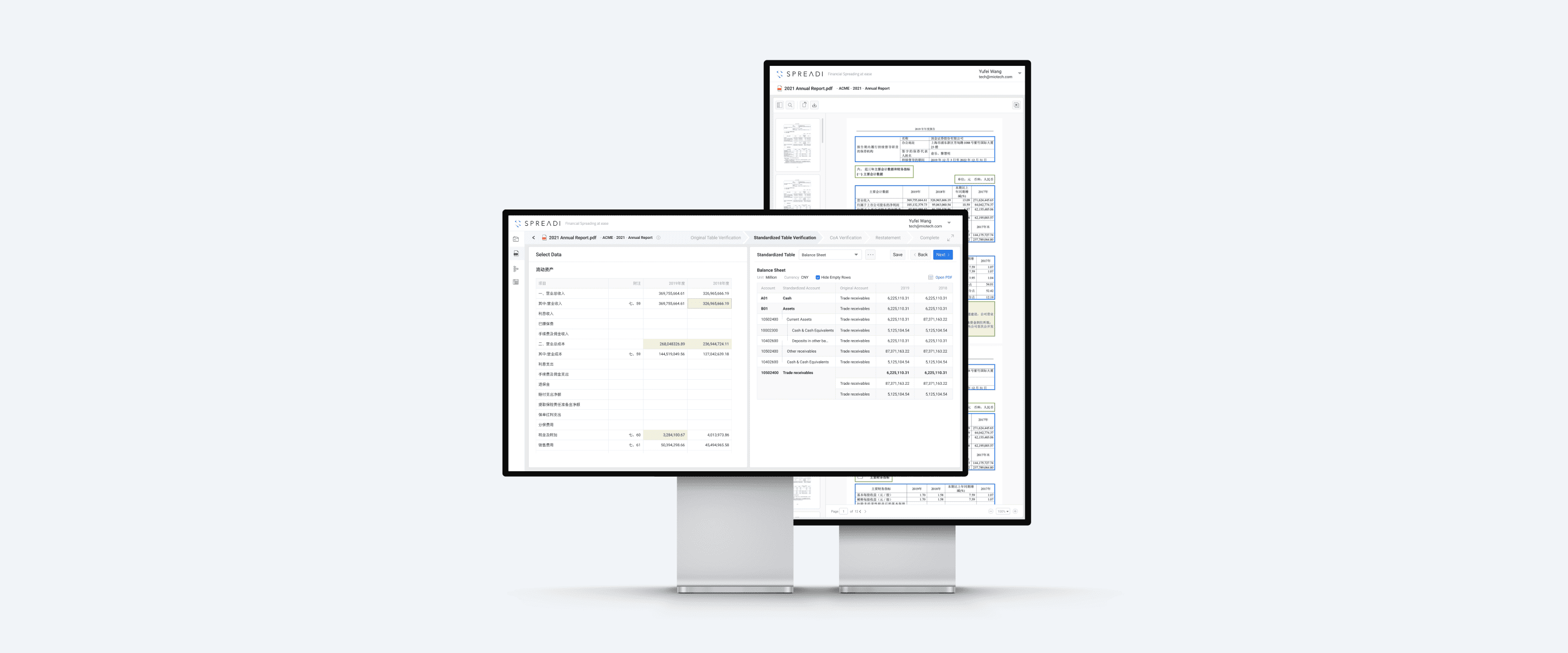
Spreadi is an AI-powered financial data processing and analysis tool that enables the extraction, mapping, and analysis of financial statements.
I joined the Spreadi team when the product was in its early stages. Building upon the initial version, I took ownership of its core feature, PDF Extraction, and drove the iterative design process with a focus on traceability and trustworthiness for enterprise users. I collaborated closely with the product team and engineers to translate complex OCR/AI capabilities into intuitive UX/UI patterns.
Company
MioTech
Product
Web App
My Role
UX Designer
Context
Spreadi leverages advanced image recognition and machine learning to extract data from texts, images, and scanned PDFs with high accuracy. The core product value lies in transforming unstructured financial disclosures into standardized, analyzable data structures.
The challenge
In B2B financial sectors, AI hallucinations or extraction errors carry massive risk. Analysts cannot rely on a "black box" where data magically appears; they need absolute certainty. Furthermore, financial statements are notoriously dense, leading to severe cognitive overload when users attempt to verify AI outputs against original documents.
The challenge was to design a system that automates the heavy lifting while giving the user total, frictionless control over verification and error correction.
How to design a system that build trust with users and meanwhile allow for seamless verification?
Core solutions
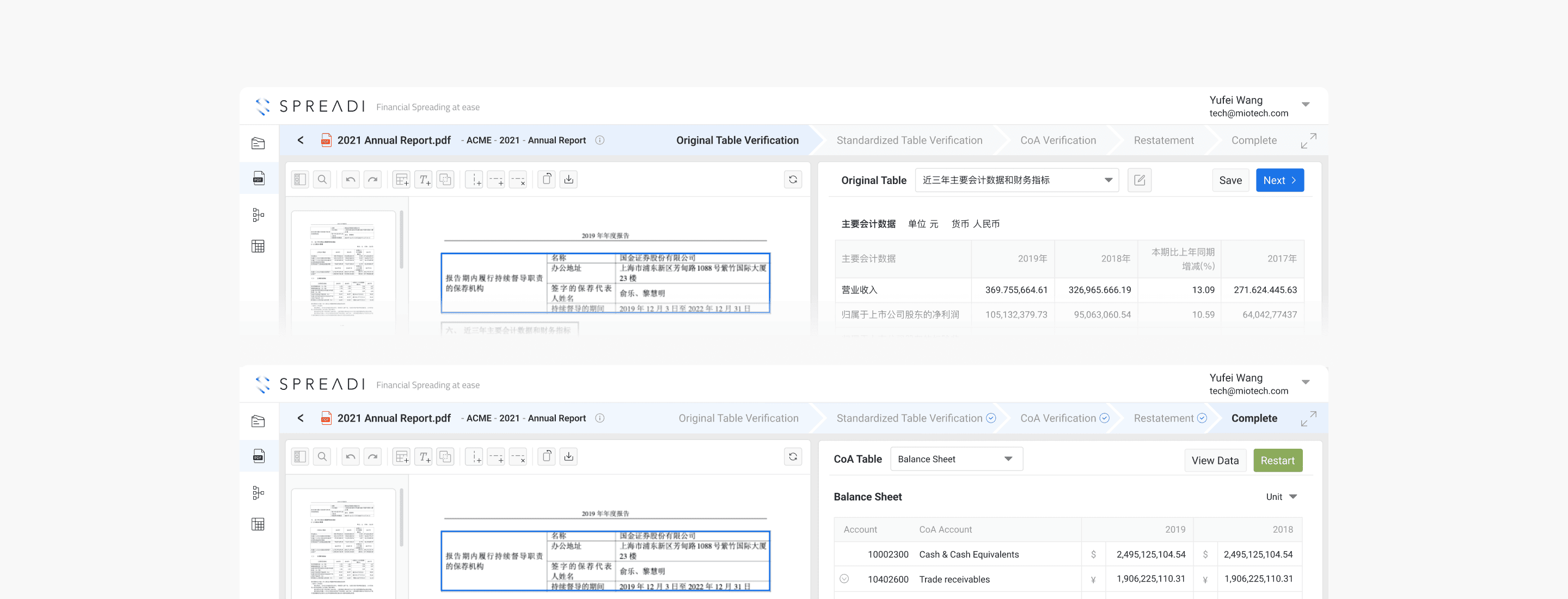
The Flexible Verification Pipeline
Instead of a single, overwhelming output, the data parsing journey is broken down into a structured, transparent pipeline.
This step-by-step flow builds trust by allowing users to validate data incrementally. Rather than relying on a complex, upfront configuration module, users can navigate linearly or jump back to any previous step at any time to adjust mappings. This intentional limitation of overarching settings in favor of an iterative workflow keeps the interface focused and drastically reduces friction.
Core solutions
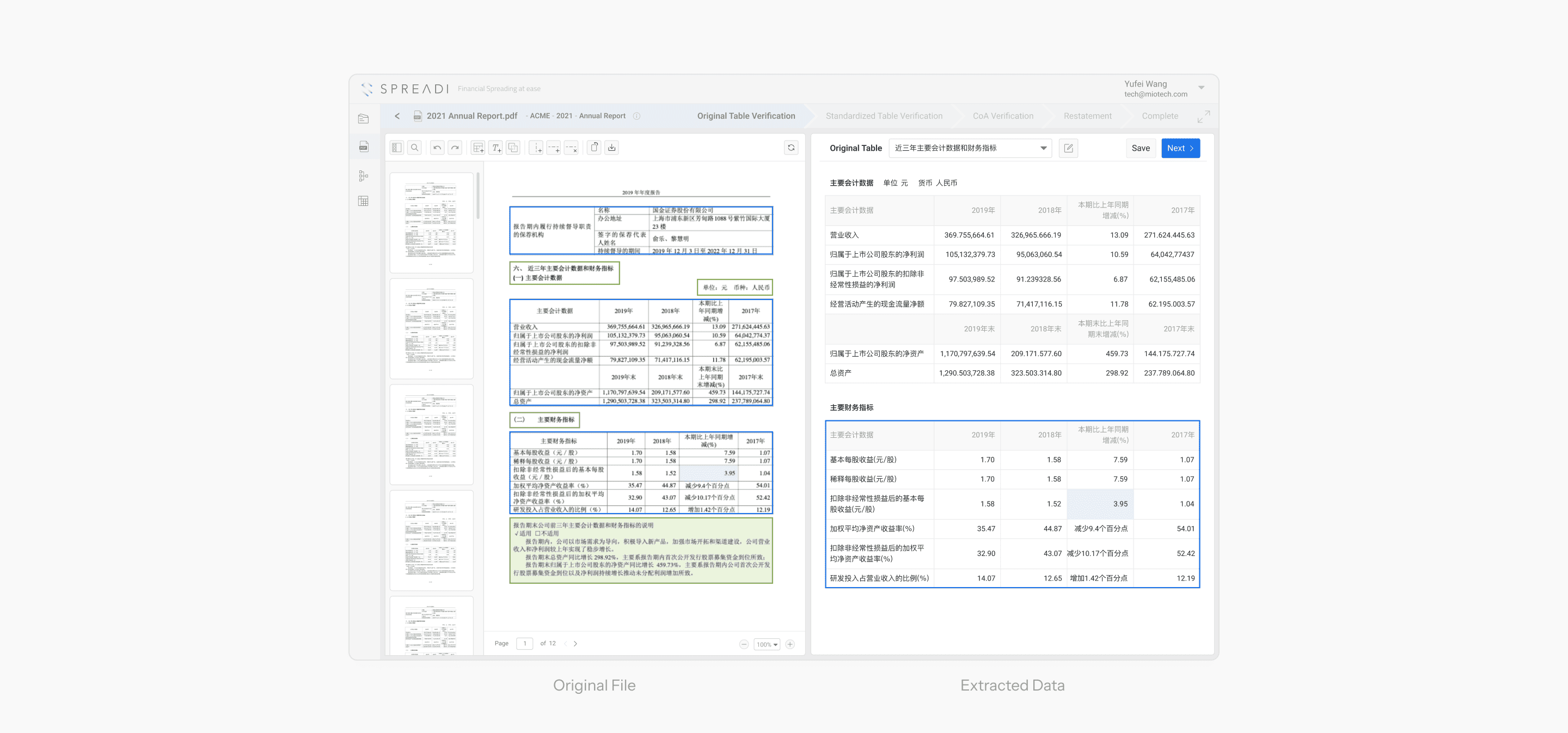
Contextual Split-Screen Architecture
To eliminate the need for users to switch tabs or dig through physical documents, the core workspace utilizes a persistent split-screen layout: the original PDF on the left, and the extracted data which requiring validation on the right. Users can select the value on the right, the left panel automatically highlights the exact source text or image, ensured every data point could be traced back to its source.
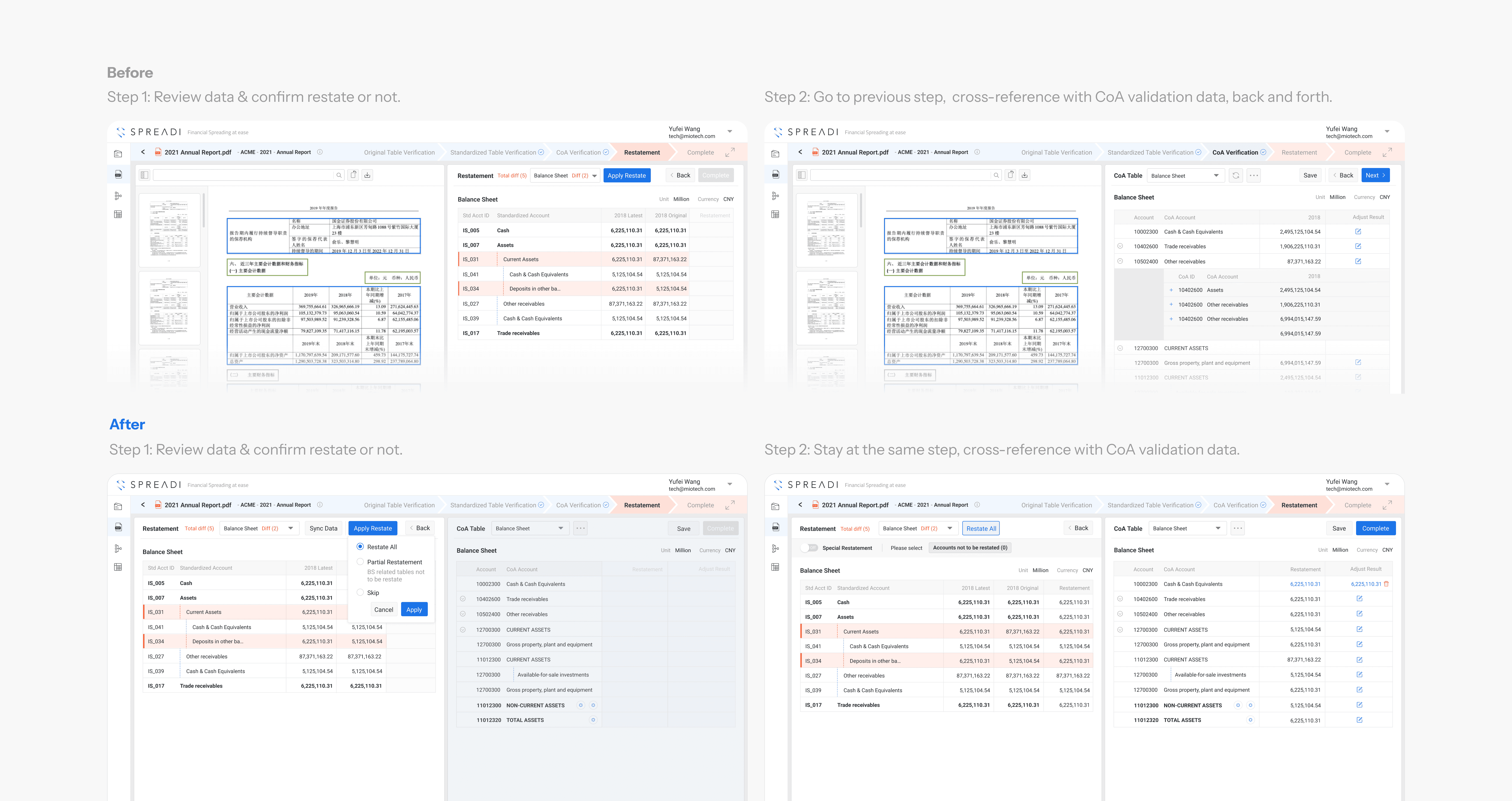
After gathering user feedback, we discovered that this rigid layout broke down during the fourth step—the "Restatement" phase:
Navigational Friction
Analysts needed to cross-reference previous CoA validation data rather than the raw PDF, leading to increased cognitive load and the risk of data comparison errors.
Inefficient Real Estate
The original PDF occupied 50% of the screen despite being rarely needed in this late stage.
Optimized Journey Map: An Adaptive, Data-Centric Layout
To address these issues and accommodate real use cases, we first mapped out a revised, frictionless flow for the Restatement phase.
Rather than forcing a one-size-fits-all layout, I dynamically reconfigured the split-screen specifically for this step.
The Execution
I replaced the static PDF panel with the CoA Validation data, placing it directly alongside the Restatement interface.
Progressive Disclosure
The right-hand CoA panel only unlocks when a restatement is triggered. This allows for instant, side-by-side comparison within a single view, eliminating the need to backtrack.
The layout directly supports the auditor's need to ensure linkage and balance across periods, which is the critical 'Check-and-Balance' phase of financial restatement.
Core solutions
Visual Triage for
Exception Management
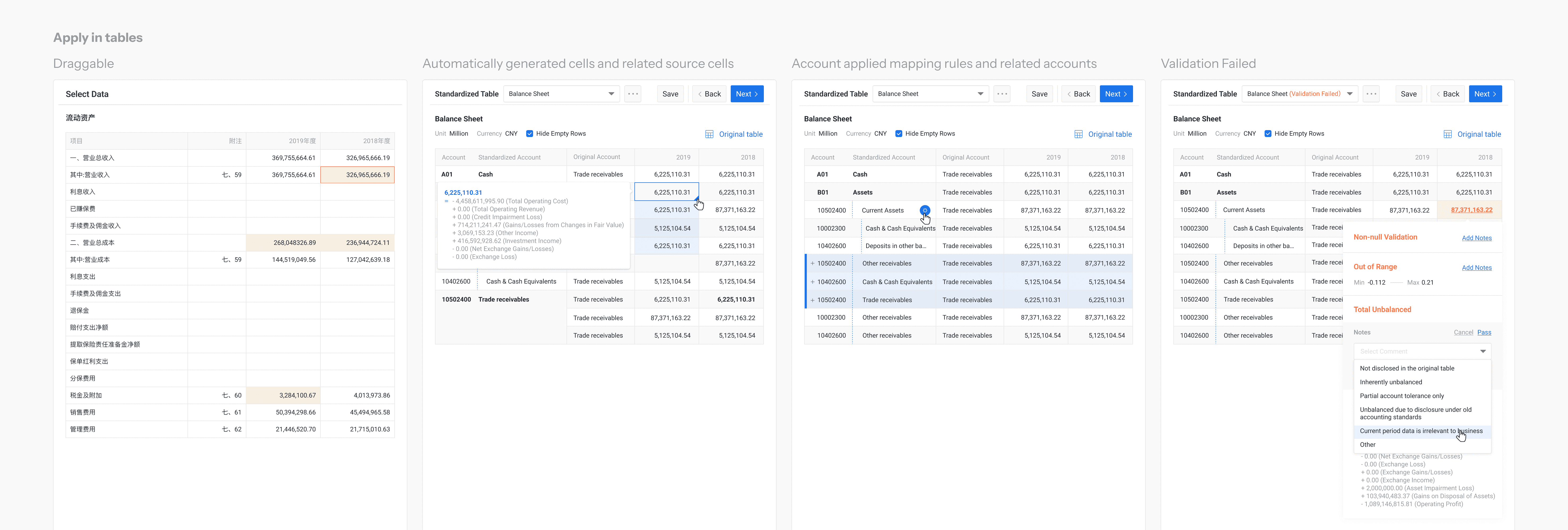
We designed visual hints to help enterprise users easily locate AI errors. Because these hints primarily live within high-density data tables, the tables themselves must clearly convey their intended status. As the data table acts as a cohesive ecosystem spanning the entire verification pipeline, we established a strict, systematic design standard for all tabular displays.
Challenge
Typically, altering text and cell background colors is an effective way to enhance visual alerts and convey different data states. However, as feature requirements grew, an over-reliance on diverse colors and symbols risked causing user confusion and cognitive overload.
Solutions
Standardizing Color and Typography
We applied a unified set of color and precise typography rules across the entire system. This consistency ensures that once users learn a visual pattern, they can rely on their intuition in all subsequent steps.
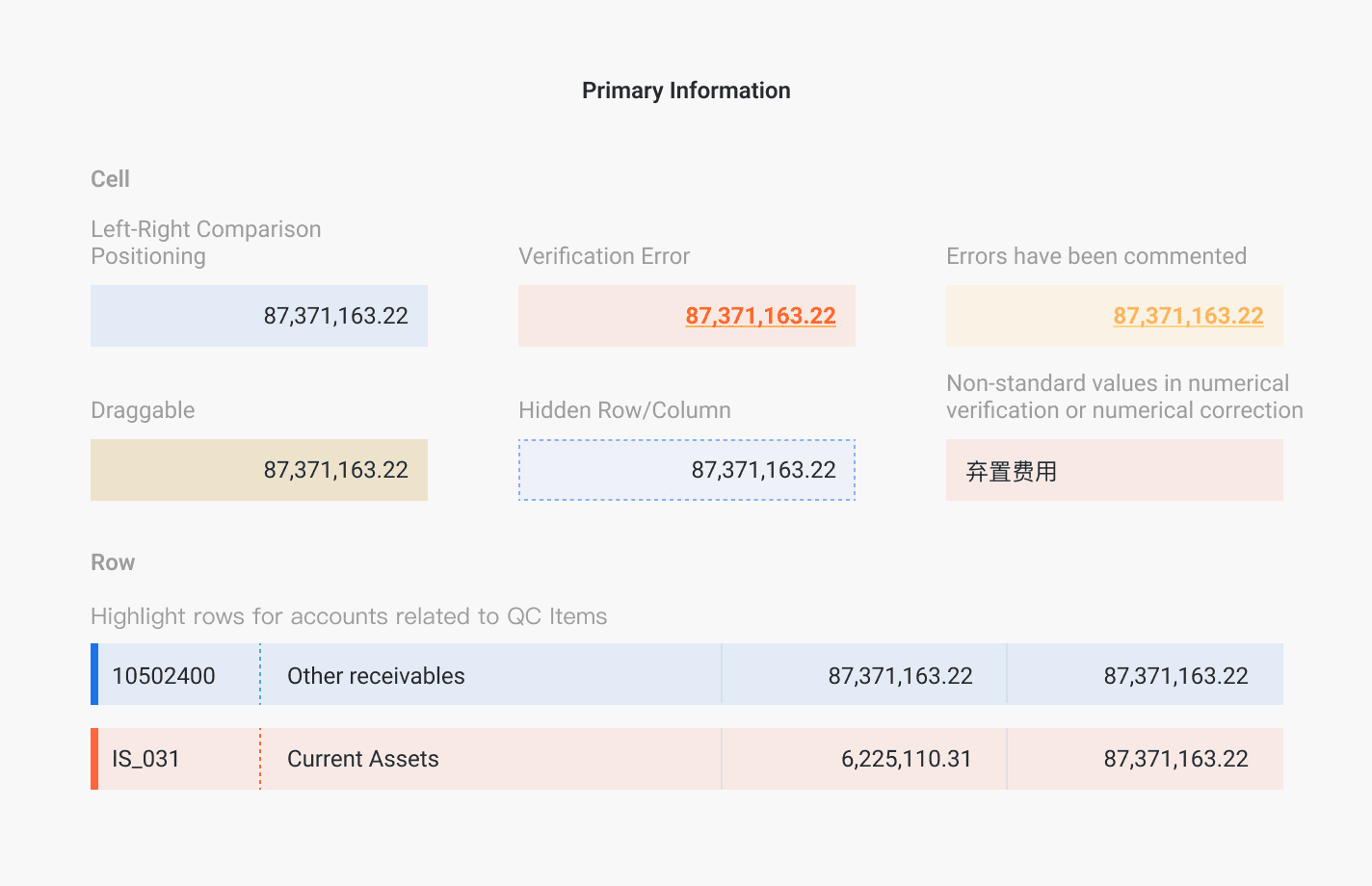
To maintain a clean, tech-driven aesthetic, we intentionally restricted the color palette to three semantic choices: Red (errors, failures, or data diffs), Yellow (warnings and alerts), and Blue (the primary brand color for highlights and emphasis). Additionally, cells containing expandable details use underlined text, acting as a subtle affordance to signal clickability.
Establishing an Information Hierarchy with Iconography
An excessive use of color dilutes semantic meaning and clutters the interface. To preserve a minimalist layout, I categorized system alerts into two distinct tiers:
Tier 1 (Primary Information)
Critical or active operational alerts that demand immediate, at-a-glance attention
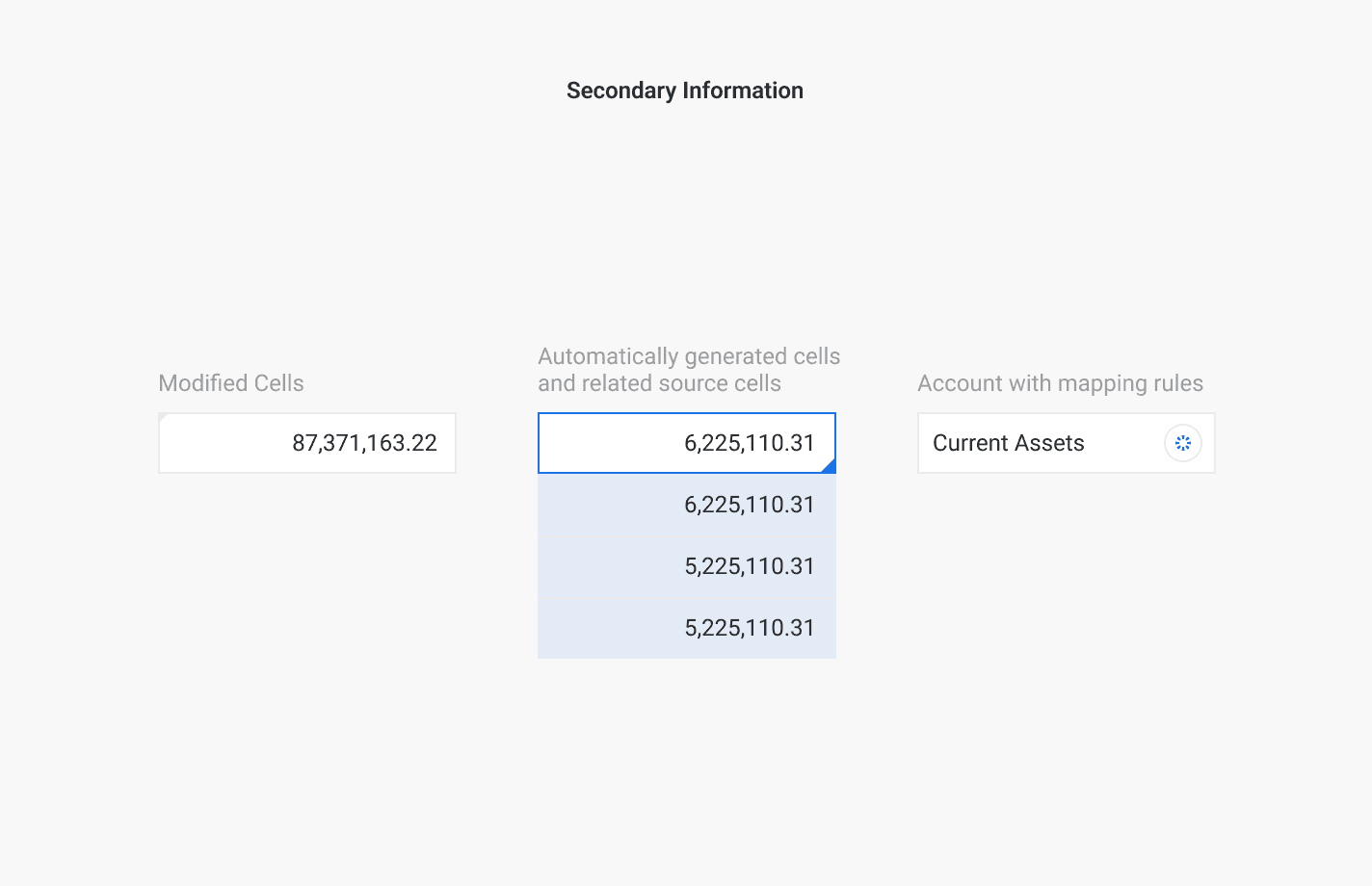
Tier 2 (Secondary Information)
Lower-priority context or dense data where color coding alone would be insufficient.
To support this hierarchy, we introduced distinct iconography. These symbols serve as secondary visual cues, ensuring they do not compete with or confuse the primary, Tier-1 color-coded alerts.
This "visual triage" system ensures that the most critical issues draw the eye immediately, turning a tedious manual review into a rapid, targeted intervention.